
AI Lead Scoring & Prioritization
Crusource CRM features built-in AI Lead Scoring powered by Loop AI. Every lead receives an intelligent qualification score between 0 and 100, segmented into priority bands so your team focuses on the highest-probability prospects first.
Understanding the Priority Bands#
| Band | Score Range | Indicator | Recommended Action |
|---|---|---|---|
| Hot | 75 – 100 | 🔥 Red Flame | Immediate outreach within 1 hour; schedule executive demo. |
| Warm | 45 – 74 | ⚡ Yellow Lightning | Nurture with personalized content, follow up within 24 hours. |
| Cold | 0 – 44 | ❄️ Blue Snowflake | Enroll in automated email campaign or low-touch marketing flow. |
Step 1: Open Any Lead Record#
- Navigate to Leads in the sidebar.
- Click on the lead name you want to evaluate.
- Locate the AI Insights & Lead Score card in the upper-right corner of the profile.
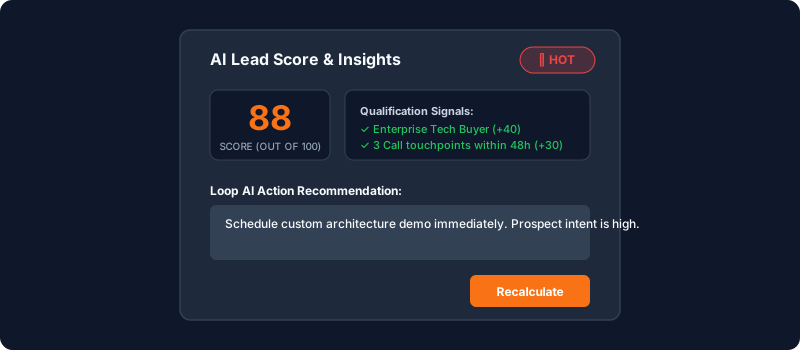
Step 2: Trigger Real-time AI Scoring#
- If the lead is newly created, click the Calculate AI Score button.
- Loop AI analyzes:
- Company Firmographics: Industry sector, estimated company size, revenue tier.
- Contact Seniority: Job title decision-making authority (e.g., VP, Director vs Intern).
- Engagement Velocity: Recent call logs, email replies, meeting acceptances, and recency of touchpoints.
- Within seconds, the score refreshes with an itemized explanation breakdown.
[!NOTE] AI Lead Scoring is also triggered automatically whenever a new activity (such as a call log or email reply) is recorded against the lead.
Step 3: Filter Leads by Priority Score#
To prioritize daily sales outreach:
- Return to the main Leads list.
- Click Filter above the table.
- Select
AI Priority Band = Hot. - Click Apply Filter to view only high-intent prospects.
Troubleshooting & FAQs#
Why is a lead score marked as "Cold" despite having multiple emails?#
If the logged interactions show no prospect engagement (e.g., unanswered emails or missed calls), the engagement velocity factor decreases. As soon as the prospect replies or attends a meeting, the score will adjust upward.
Have a question about AI Lead Scoring & Prioritization?
Ask Loop AI for step-by-step guidance, permission requirements, or troubleshooting tips directly within the docs.
